

A result image is evidence to inspect, not the final declaration. To understand how to check Nigerian election results, use INEC’s IReV portal to find the polling-unit result and examine its EC8A sheet, then compare the recorded details. IReV displays uploaded result sheets; it doesn’t declare winners or replace formal collation.
It’s reasonable to scrutinise figures that appear inconsistent, but a missing sheet alone does not establish manipulation. The presiding officer completes and signs the result form before BVAS photographs it for upload, giving you an image to compare with the figures shown.
This guide explains how to access IReV, locate polling-unit results and read the key details on an EC8A sheet. It also sets out what to compare when checking for discrepancies, and why an incomplete upload or a difference in totals needs careful interpretation before drawing conclusions.
Key Takeaways
- Use IReV to access uploaded results from current and previous elections; first-time users receive a six-character activation code by email.
- Compare the figures on an EC8A sheet, including candidate votes and totals, and distinguish a discrepancy from a sheet that has not been uploaded.
- Filter results by election and polling unit, then use the displayed location details to identify the sheet you need to inspect.
- Keep IReV’s role in perspective: it provides public access to result images, while formal collation determines election outcomes.
Accessing Nigeria’s IReV portal
INEC’s Result Viewing Portal, or IReV, lets the public view result sheets uploaded from polling units. To learn how to check Nigerian election results, use the portal to find a result image and examine its details.
Opening the IReV portal
IReV is INEC’s online portal for viewing result sheets uploaded from polling units. Open it and select the election and location you want to review. First-time users receive a six-character activation code by email to access the portal. Its archive also includes results from previous elections, including Ekiti, Osun and FCT Area Council elections. You can use it to review both older polling-unit records and current uploads.
INEC first deployed IReV during an off-cycle state constituency by-election in August 2020. The systems serve different roles: one supports voter accreditation at polling units, while the other provides public access to uploaded result images.
Result announcement and updates
Election results are announced through formal collation. IReV displays uploaded sheets but does not declare winners. INEC created Nigeria’s IReV to provide real-time transmission of election results from polling units to the central collation centre. A result image is a record to inspect, not the final declaration of an election outcome.
There is no single update time for every polling unit. A result appears when its sheet is uploaded, so check the relevant election and location again if you are following new uploads. Use formal collation announcements for declared outcomes, and treat portal images as supporting polling-unit records.
Checking different election results
Use the election type and location to narrow your search for presidential, governorship, National Assembly or state assembly results. Select the relevant election, then identify the state, constituency or polling unit associated with the result you need. These distinctions matter because each contest relates to a different geographic area and ballot.
Voters in the UK and elsewhere abroad can use IReV in the same way: access the portal, select the election and find the polling-unit sheet. First-time users need the six-character activation code sent by email. Check that the election and location shown match the result you want to inspect, rather than relying on a candidate’s name alone.
Checking for discrepancies
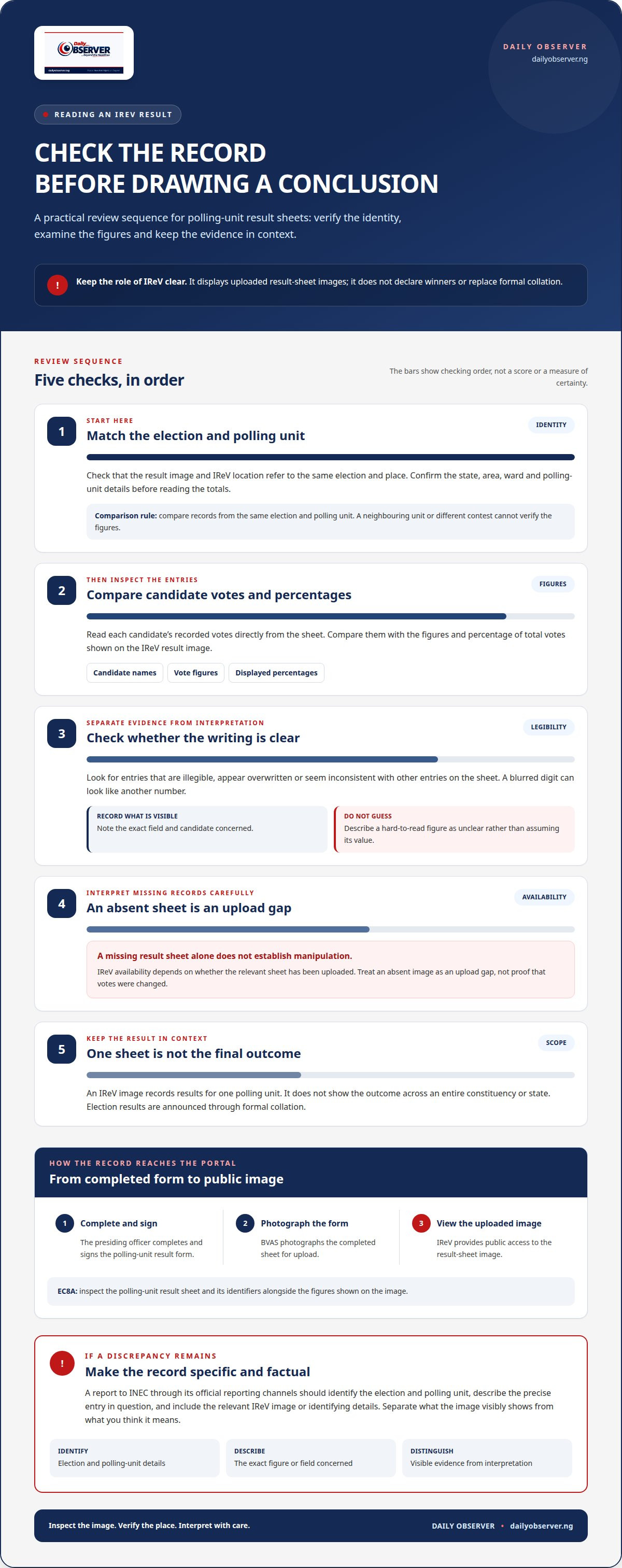
Before assessing a result, compare the IReV image with its polling-unit details. Check that the election, state, area and polling-unit identity match the sheet, then see whether the figures are clear enough to read.
Review each candidate’s recorded votes and the percentage of total votes shown on the IReV result image. Look for figures that appear overwritten, unclear or inconsistent with other entries on the sheet. A blurred digit can look like another number, so distinguish what is visible from your interpretation. Note the exact field and candidate concerned instead of labelling the whole sheet false.
- Match the polling-unit identity on the image to the location displayed in IReV.
- Compare each candidate’s recorded votes with the figures and percentages shown.
- Note any illegible, altered-looking or apparently inconsistent entry.
- Keep the election type and location with your notes, so the result can be identified.
A missing result sheet alone does not establish manipulation. IReV availability depends on whether the relevant sheet has been uploaded. Treat an absent image as an upload gap, not proof that votes were changed. A difference between figures merits examination, but consider the specific entry and its context before drawing a conclusion.
To report suspected false or manipulated Nigerian election results, send a factual report to INEC through its official reporting channels. Identify the election and polling unit, describe the precise discrepancy, and include the relevant IReV image or its identifying details. Separate what the image visibly shows from what you think it means. This gives INEC a specific record to assess without presenting an allegation as an established finding.
Compare records from the same polling unit and election. A sheet from another location or contest cannot resolve a mismatch in the result you are reviewing. If a figure remains difficult to read, describe that limitation precisely rather than guessing at the total.
Finding polling unit results
IReV displays images of polling-unit result sheets, including the votes recorded for each candidate and the percentage of total votes cast. To find the right record, first identify the election and polling unit. The location matters: a result from a neighbouring unit or a different contest cannot verify the figures you are examining.
Use the election and location information in IReV to narrow your search. Check that the state, local area, ward and polling-unit details match the place you mean. Open the result image and confirm its heading and identifiers before reading candidate totals. Names alone are not enough, as candidates may appear in different contests or locations.
BVAS has two distinct roles in this process. At the polling unit, it helps verify voter identity and accreditation. It also photographs completed polling-unit result forms and uploads their images to IReV. The portal therefore gives the public access to the form image, while the votes recorded remain tied to the polling unit identified on that form.
- Match the election type and location to the polling unit you want to inspect.
- Read the candidate names and vote figures directly from the uploaded image.
- Check the percentage of total votes displayed alongside the candidate results.
- Keep the polling-unit identifiers with any notes or comparisons you make.
IReV supports transparency by making polling-unit records visible, but it neither declares the winner nor replaces formal collation. An image shows the recorded result for one unit, not the outcome across an entire constituency or state. To understand a wider contest, compare the relevant unit records with the formal collation outcome, keeping each location and election distinct. This prevents a local result from being mistaken for a final declaration across a larger race.
Form EC8A result sheets
An EC8A sheet records the result at a Nigerian polling unit. The presiding officer fills out and signs the form before BVAS photographs it for upload. On IReV, the image lets readers examine the written record rather than relying only on a summary of candidate totals.
First match the polling-unit details on the form to the location selected in IReV. Then read the candidate names and recorded votes from the image. Check that the figures are legible, distinguishing handwritten entries from marks, shadows or image blur. Even a readable sheet cannot support a comparison if it belongs to another polling unit.
The signature and completed form provide context for the record you are viewing. The uploaded image is a photograph of a polling-unit result form, not a separate declaration of the overall winner. Use it to understand the figures recorded for that unit, while keeping the formal collation process distinct from the sheet itself.
- Confirm the polling-unit details shown on the EC8A image.
- Read each candidate’s name and recorded vote figure directly from the form.
- Note unclear writing or image quality that affects how an entry can be read.
- Keep the image’s location and election details with any comparison or report.
If a candidate’s entry is difficult to interpret, describe what is visible without filling in an unreadable figure yourself. A mark that looks like an alteration may need careful assessment; the image alone does not explain why it appears that way. Note the specific entry and its location on the form, then compare it only with records for the same polling unit and election.
For continuing context around election records and developments, follow Nigerian election coverage.
Daily Observer: Nigerian and international news coverage
Daily Observer covers Nigerian and international news for readers following election developments and their wider context. Read its reporting to follow political developments alongside other national affairs, or to understand how events in Nigeria connect with international news. Coverage includes politics, business, technology, sport, entertainment, community affairs, Metro, crime and opinion, with verified reporting, in-depth analysis and balanced coverage.
Result sheets show polling-unit records, while wider news coverage helps you follow developments beyond those documents. Visit dailyobserver.ng for further Nigerian and international reporting.
Keep following the evidence
Election records are most useful when considered carefully and in context. Distinguish between what a document visibly records, what remains uncertain and what has been formally declared. This supports informed discussion without turning an unexplained difference into a conclusion. Knowing how to check Nigerian election results can also help you assess new claims as events develop.
For context beyond individual result documents, Daily Observer’s Nigerian and international news coverage reports on political developments and related national and global affairs. Follow coverage as new information emerges, and consider how each update relates to the evidence you have reviewed.
Explore Daily Observer’s latest reporting and continue following the issues with care and confidence.
Frequently Asked Questions
Where can I check official Nigerian election results online?
Use INEC’s IReV portal to view uploaded polling-unit result images. For a declared outcome, distinguish these records from the result reached through formal collation: IReV itself does not make the declaration. Treat any reported total as a claim to compare with relevant INEC material before sharing. Keep the election type and location alongside the figures, as they identify the contest the record concerns.
How can I check results for a specific state, constituency, or polling unit in Nigeria?
Select the election category and narrow your search using the relevant geographic details. A governorship result and a state assembly result from the same state are separate contests, so select the right election before interpreting figures. For a constituency, use its name or location details. For a polling unit, make sure the record matches that unit, not a nearby one.
How do I verify polling-unit results from INEC Form EC8A?
Read the EC8A image as a record for one polling unit, then compare the candidate entries with the corresponding result details. Check that the candidate and location identifiers belong to the contest you’re reviewing. If handwriting or image quality makes a figure hard to read, record it as unclear rather than guessing. That keeps your comparison grounded in what the form visibly shows.
What should I do if Nigerian election results are missing or disputed?
First establish whether the issue is a missing upload, an unreadable entry or a specific disagreement over figures. A missing sheet alone does not establish manipulation. Note the election and polling-unit details, describe the precise issue and report suspected false or manipulated results through INEC’s official reporting channels. Keep observations separate from conclusions so the concern can be assessed against the relevant record.
